Django and PostgreSQL – improving the performance with no effort and no code.

It’s a long post, so we’ll start with a summary:

Application performance
We will be using:
- Django 1.3 + Jinja2 2.6-dev
- nginx 1.0.4 + gunicorn 0.12.2 (1 worker)
- PostgreSQL 8.4
Performance test will be performed using:
- Blitz – set to sweep 1-110 users
- Apache Benchmark – with concurrency set to 1, and 100 request – to average out the single request time
Case study
Yup, it’s going to be a social example. I know. We start with a simple twitter-like application (microblogging, but without followers – what a twist!). Let’s call it:
The Tuitter!
You can see the source code at . This repository contains a few more clever files, but we will not talk about them just yet, their time will come in the next few weeks (keep in touch for The Big Django Hosting real cost and performance review).
We will be looking at the performance of the index site, which checks your session (kept in the DB – Django default – we do not recommend this on production) and prints out 10 latest Tuits (using INNER JOIN query). It will come in 2 flavours:
- / – using Django templating engine
- /jinja2/ – using the excellent Jinja2 templating system (we DO recommend using it!)
See the Demo here.
Stage 1
We’ve created some user accounts and Tuitted some Tuits to fill the DB. Let’s use blitz to find out it’s melting point.
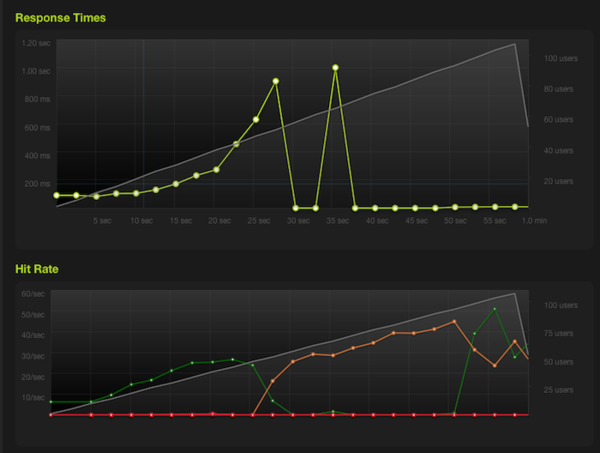
Stage 1 – Django templates
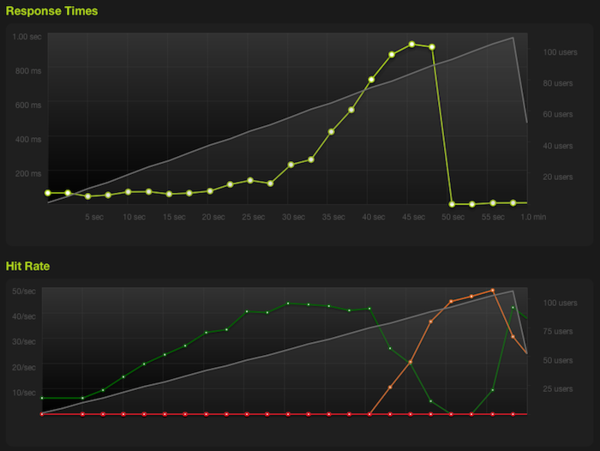
Stage 1 – Jinja2 templates
Apache Benchmark shows:
Requests per second:    24.04 [#/sec] (mean)
Time per request:       41.602 [ms] (mean)
Time per request:       41.602 [ms] (mean, across all concurrent requests)
Using Jinja2:
Requests per second:    31.40 [#/sec] (mean)
Time per request:       31.850 [ms] (mean)
Time per request:       31.850 [ms] (mean, across all concurrent requests)
It peaked at 24 requests/second. By the way – see the advantage of using Jinja2? – it made 31 requests/second.
So let’s profile this view. We use our simple (just add it to your MIDDLEWARE_CLASSES, as the first item). If you add ‘?profile=’ to the URL, it will display the profiling data.
 ncalls  tottime  percall  cumtime  percall filename:lineno(function)
      3    0.013    0.004    0.013    0.004 {cursor.execute}
      1    0.007    0.007    0.007    0.007 {psycopg2._psycopg.connect}
     22    0.002    0.000    0.003    0.000 base.py:275(__init__)
   1560    0.002    0.000    0.002    0.000 {isinstance}
  22/11    0.002    0.000    0.007    0.001 query.py:1128(get_cached_row)
294/284    0.001    0.000    0.003    0.000 encoding.py:54(force_unicode)
Problem
Whoa, so we’re spending most time in psycopg2._psycopg.connect, just connecting to the PostgreSQL? What can we do to improve it?
Solution
Well, we’ve got to try connection pooling. Each time you make a request, Django makes a new connection to the database. Pooling means that each gunicorn instance will have its own connection set up and never closed, so it would reduce the need to call _psycopg.connect. But that would mean having to modify Django. We do not want to do that, as it makes upgrading Django and using fabric/pip deployment painful in the long run.
We’ve got 2 options:
They are both production ready solutions. From the user perspective they are used the same way – we connect to them instead of the database, and they deal with the connection pooling.
Stage 2 – pgpool-II
Installing pgpool
On Debian just do a:
apt-get install pgpool
pgpool configuration
The file we’re interested in is pgpool.conf. In Debian it will be in /etc, if you compile pgpool from source, you will have to copy and rename the sample configuration file to pgpool.conf.
Default options are all right, we just have to set the database info. Set options:
backend_host_name, backend_port, backend_socket_dir to your PostgreSQL instance info. By default pgpool will listen at the port 5433. Start pgpool up, change the database port in your settings.py and your ready to go.
Performance
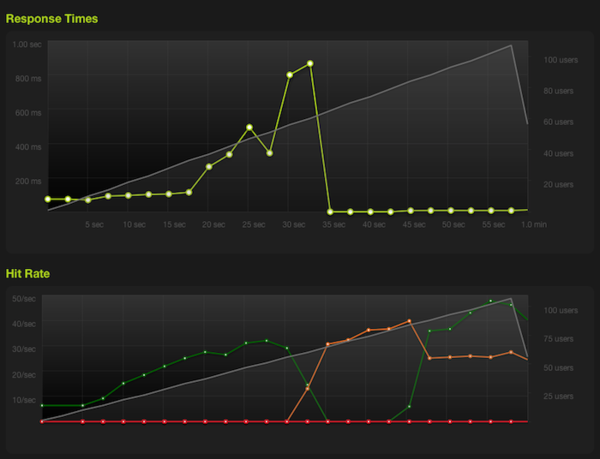
Stage 2 – Django templates + pgpool
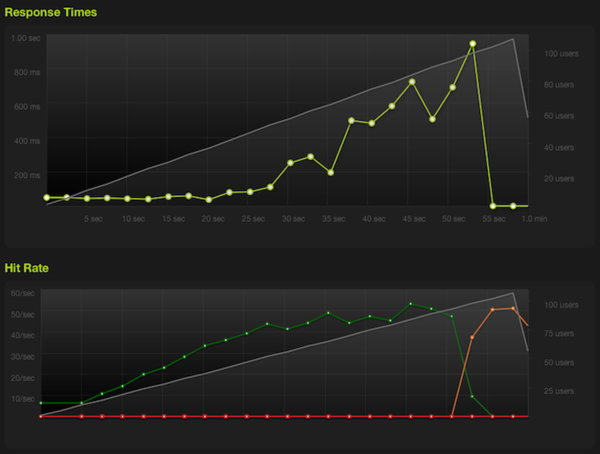
Stage 2 – Jinja2 templates + pgpool
Apache benchmark shows:
Requests per second:    30.74 [#/sec] (mean)
Time per request:       32.534 [ms] (mean)
Time per request:       32.534 [ms] (mean, across all concurrent requests)
Using Jinja2:
Requests per second:    48.93 [#/sec] (mean)
Time per request:       20.437 [ms] (mean)
Time per request:       20.437 [ms] (mean, across all concurrent requests)
This time we peaked at 31 requests/sec (49 for Jinja2). Well, it’s better by 20%, with almost no effort! But profiling data says that we still spend much time connecting, which is caused by pgpool having to authorize us every time with the database. It would help much more if the database server was in a different datacenter.
Stage 3 – pgBouncer
Now it starts getting interesting. pgBouncer is a event-driven connection pooler, which will not authorize your every connection. Instead it will authorize you itself using PostgreSQL’s auth file or even your own text file with users and passwords. This should make our application perform A LOT better.
Installing pgBouncer
Use to compile it from source (Debian/Ubuntu-compatible) or do it yourself.
pgBouncer configuration
Modify the configuration file (or the sample configuration file available in etc/pgbouncer.ini of the source code copied over to /usr/local/etc/pgbouncer.ini):
- Modify the [databases] section to look like this (if your server is on your local machine on the default port):
[databases]
* = host=127.0.0.1 port=5432
- In [pgbouncer] section:
- Set the listening port for example to:
listen_port = 6432
- Set the authorization file, if using PostgreSQL 8.x on default settings:
auth_file = /var/lib/postgresql/
/main/global/pg_auth - Set the log and pid files:
logfile = /var/log/pgbouncer.log
pidfile = /tmp/pgbouncer.pid
- You have to set the user pgBouncer will run as:
user = postgres
You can choose any user, as long as it’s not root. We will not dwell about security here.
- Set the listening port for example to:
- Run by executing:
su -l postgres -c "pgbouncer -d /usr/local/etc/pgbouncer.ini"
- Modify the settings.py file, set the database port accordingly (in this example – 6432).
Done. Let’s get it smoking:
Performance
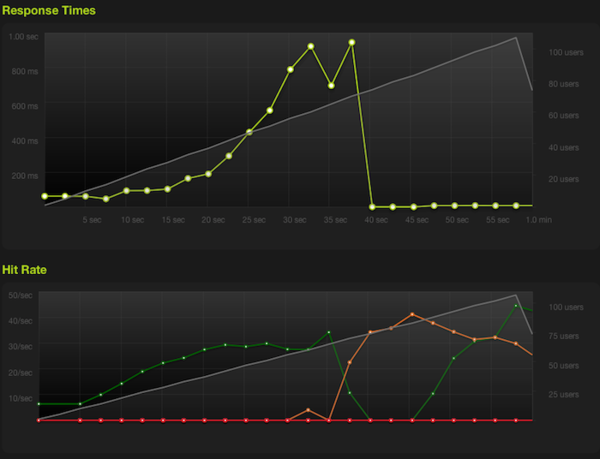
Stage 3 – Django templates + pgBouncer
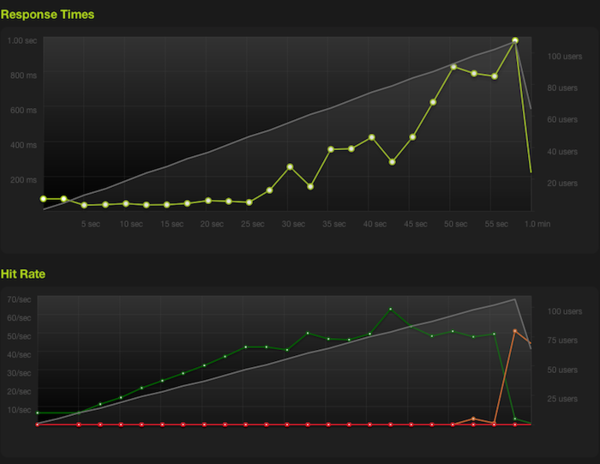
Stage 3 – Jinja2 templates + pgBouncer
Apache Benchmark shows:
Requests per second:    36.44 [#/sec] (mean)
Time per request:       27.445 [ms] (mean)
Time per request:       27.445 [ms] (mean, across all concurrent requests)
Using Jinja2:
Requests per second:    70.99 [#/sec] (mean)
Time per request:       14.086 [ms] (mean)
Time per request:       14.086 [ms] (mean, across all concurrent requests)
Well well well, peaked at 37 requests/second, that’s 50% better than what we started with! With Jinja2: 71 req/s. It will be even better for you – this server has only one CPU core – and we hit another limit, this time we’re CPU, not I/O bound (as a side effect – that’s why Jinja2 is 2 times better this time).
Next week Tomek Kopczuk () will write about running Django on Heroku‘s brand new cedar stack and getting the most out of it (6 times more, in fact).
Follow us on Twitter!

Comments
Pingback: Getting Django on Heroku prancing 8 times faster. | Ask The Pony()
Pingback: Fabric script to deploy combined and otherwise optimized media. | Ask The Pony()
Pingback: Python RESTful webservices with Python: Flask & Django solutions | Solution4Future blog()
Pingback: Flask/Django: Python RESTful API | webMASTAH()
Pingback: sharpek.net » „Wysokowydajne” django()